Icon of program: DVDFab

DVDFab for Windows

  • Trial version
  • 3.5
    654
  • 647.5K
  • V13.0.5.2
Download for Windows

View an ad to download for free

Copy entire DVDs and Blu-ray Discs to your hard drive

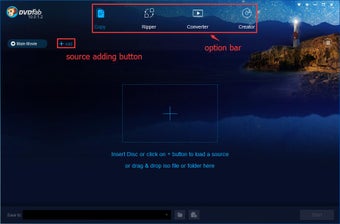
DVDFab is an all-in-one DVD ripping/decrypting/burning software. In just one or two steps, you can copy DVDs to DVDR/PSP and even iPod. For such a powerful package, it only requires 1.3MB of your harddrive, so it's not bulky like similar packages.

Unlock your creativity with Adobe Stock

Get 10 images or 1 video with a free trial

DVD protection is advancing at an ever increasing rate but unfortunately for the manufacturers, so are the ripping programs. If you’ve ever had problems copying one of your favorite DVDs then DVDFab could be what you’ve been looking for. It has proved popular a hit with thousands of Softonic users so far and there seems little prospect of its popularity waning.

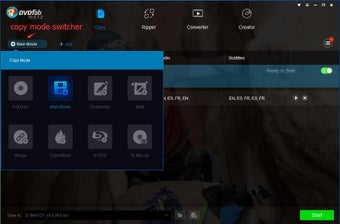
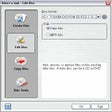
The DVDFab conversion process couldn’t be easier. There are 5 DVD to DVD copy modes available - Full Disc, Main Movie, Split, Customize and Clone. In Full Disc mode, all movies, menus and trailers are copied to a DVD in one click. In Main Movie mode, only the movie is copied with your specified audio. In Split mode, you can copy a DVD-9 onto two DVD-5 discs but also preserve the original menus on both discs. According to the DVDFab developers, this rare feature is ideal for TV series on DVD.

DVDFab's handy Customize mode allows you to personalize your DVDs by recording such things as only your favorite scenes, removing adverts or selecting only certain audio tracks. Finally, Clone allows you to make exact 1:1 bit-to-bit copies or even copy games disks such as PS2 DVD’s. There is also a DVD to Mobile option so you can watch your favorite films on your iPod or other handheld device. Formats available on DVDFab include MPEG-4, DivX, XVID and Mp4.

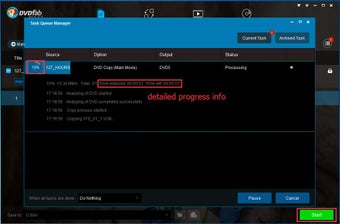
DVDFab is a tough cookie – even disks that refuse to be copied with other programs can usually be cracked. The customize option allows you to get rid of files that stand in your way and just rip the actual movie. It can also help in recovering scratched or dirty disks that don’t play properly in your DVD player anymore. Ripping speed is remarkably fast with DVDFab - depending on the size of disk, you can record a new one in less than 10 minutes, although the average time is around 30 minutes.

One of the minor drawbacks to DVDFab is that the heavy processing power needed to rip a disk often results in crashes. This will be less of a problem on more powerful machines but on machines with old processors, using DVDFab may become impractical. Many user forums are however full of praise for DVDFab claiming that it can rip more disks and, what's more, faster than comparable products such as DVD Shrink or ShrinkTo5.

Everybody will appreciate the simplicity and power of DVDFab, a rip-roaring DVD ripper..

Updated A/V codecs. New: Updated language files. New: Many minor changes and improvements.

  • Pros

    • Simple interface
    • Can copy most formats
    • Burns new DVDs quickly
  • Cons

    • Can freeze up your PC occasionally
    • Some users report a reoccurring “Error while loading VOB file...”
 0/3

App specs

Program available in other languages


Icon of program: DVDFab

DVDFab for PC

  • Trial version
  • 3.5
    654
  • 647.5K
  • V13.0.5.2
Download for PC

View an ad to download for free


User reviews about DVDFab

3.5

21 reviews

Add review

Main reviews for you

  • Claire Wayne

    Better than I remembered

    I recently tried DVDFab again on my Windows for a few older discs. It feels more polished now than I remembered. The best part is that I can choose the audio and subtitle tracks before converting, which saves me from having to fix things later. It is not lightweight, and I would say the features are necessary.

  • Summer Wang

    DVDFab saves my older DVDs

    I used DVDFab on my Windows PC to convert a few videos from my personal disc collection. The interface has a lot of options, so it took me a little while to understand where everything was, but the basic workflow was not difficult after the first try. What I liked most is that the output quality was consistent and the audio/subtitle options were easy to adjust. It is not the lightest program, and some features are clearly aimed at more advanced users, but for organizing older media files, it has been useful for me.

  • Anonymous user

    All-in-one package too all your DVD backups. This is the "all-in-one" solution to all my dvd's backup projects. It is fast, quality and updated frequently to support new protections. Love the recent Cinavia protecton removal tool. it is awesome!! also it is easy to use program and really at the tops if you compare it with others in same category. I just love it. recommended!! Pros: Easy to useFrequently updated to support new copy protectionsCinavia removal tool



  • Anonymous user

    Very convenient,very great tool!. I have some movies on DVD, but I want to watch it on my phone, tablet, somewhere else. With my DVDFab DVD Ripper,I can "rip" that DVD—or turn it into a movie file on my computer—to play it wherever I want.

  • Anonymous user

    Poweful ability!. It can keep the contents of the original DVD intact with an amazing final output with the user's choice of type of output.It has the ability to copy, burn and clone a DVD within a matter of few clicks!

  • Anonymous user

    Very very useful and nice to use!. DVDFab Blu-Ray Ripper is designed for backup my favorite Blu-ray movie to you my computer by converting Blu-ray to various video formats, such as AVI, DivX, XviD, DVD, WMV, MPEG4, with almost the same quality.I feel it is really very useful for me.

More

You may also like

Alternatives to DVDFab

Explore Apps

Latest articles

Laws concerning the use of this software vary from country to country. We do not encourage or condone the use of this program if it is in violation of these laws.
Softonic

Is DVDFab safe?

100/100

Score result: Clean

This file passed a comprehensive security scan using VirusTotal technology. It is safe to download.

  • Virus free
  • Spyware free
  • Malware free
  • Verified by Security Partners

    VirusTotal logo

Scan Info

Last scan
Tuesday, May 19, 2026
Scan provider
VirusTotal · Full report

File Integrity

File
DVDFab_Bluray_Copy_V13.0.5.2.exe
SHA256
d194b5d33954f3ff2206fde7e9f3d3f918f11c035dc5a39f3b59bf5d8a7730b3
SHA1
4e3cf4abdac9900c87bd8f65b3475080ac02a370

Softonic security commitment

DVDFab has been thoroughly scanned by our advanced security systems and verified by industry-leading partners. This file comes from the official developer and has passed all our security checks, showing no signs of viruses, malware, or spyware. For more information, visit our Security and Trust Center

Signed in to Softonic as